WINDOWS DESKTOP APP · LOCAL-FIRST

The job search, with a record.

JobLedger runs your job hunt as a pipeline: agents search and score, you promote and apply. Every role records which source found it, which CV went out, and where the process died.

Download for Windows
Windows 10 / 11 · free · runs on Claude Code or Codex
Watch the demo on YouTube
A ROLE MOVING THROUGH THE PIPELINE, START TO FINISH

How it works

A job search gets better when it's legible: which source found the role, which CV went out, where the process stopped. JobLedger keeps that record, so the next hundred applications produce a diagnosis.

SEARCH RESULT OPPORTUNITY JOB
you promoteyou apply

One record, three stages, a human promotion at every boundary. Agents propose candidates; every promotion, and every application, is yours to make.

01 — HOME

Open the app, see what needs you

Home is an inbox: new leads you haven't looked at, opportunities awaiting a decision, and applications gone quiet. Each card jumps straight to its record, and a lead stays new until you actually open it.
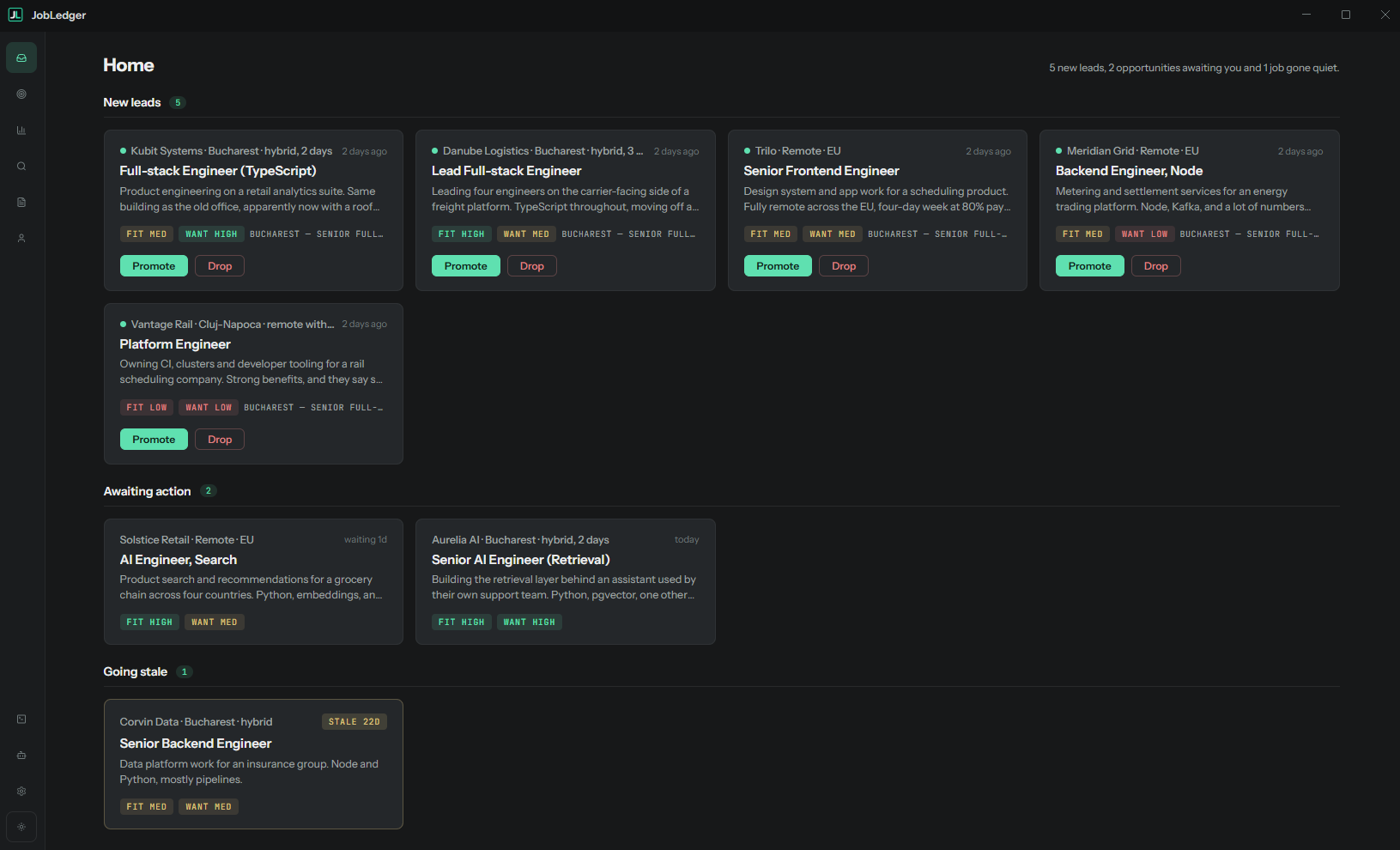
JobLedger Home: new leads with Fit and Want scores and promote or drop actions, opportunities awaiting action, and a job going stale
02 — THE RECORD

Where processes die

A rejection requires a stage: no response · after screen · after first interview · after final. A screen failure means the CV is the problem; a post-contact failure means the interview story is. One dropdown, answered permanently. Quiet applications get flagged as stale after a threshold you set, straight onto Home, so "they never answered" becomes a recorded outcome too.
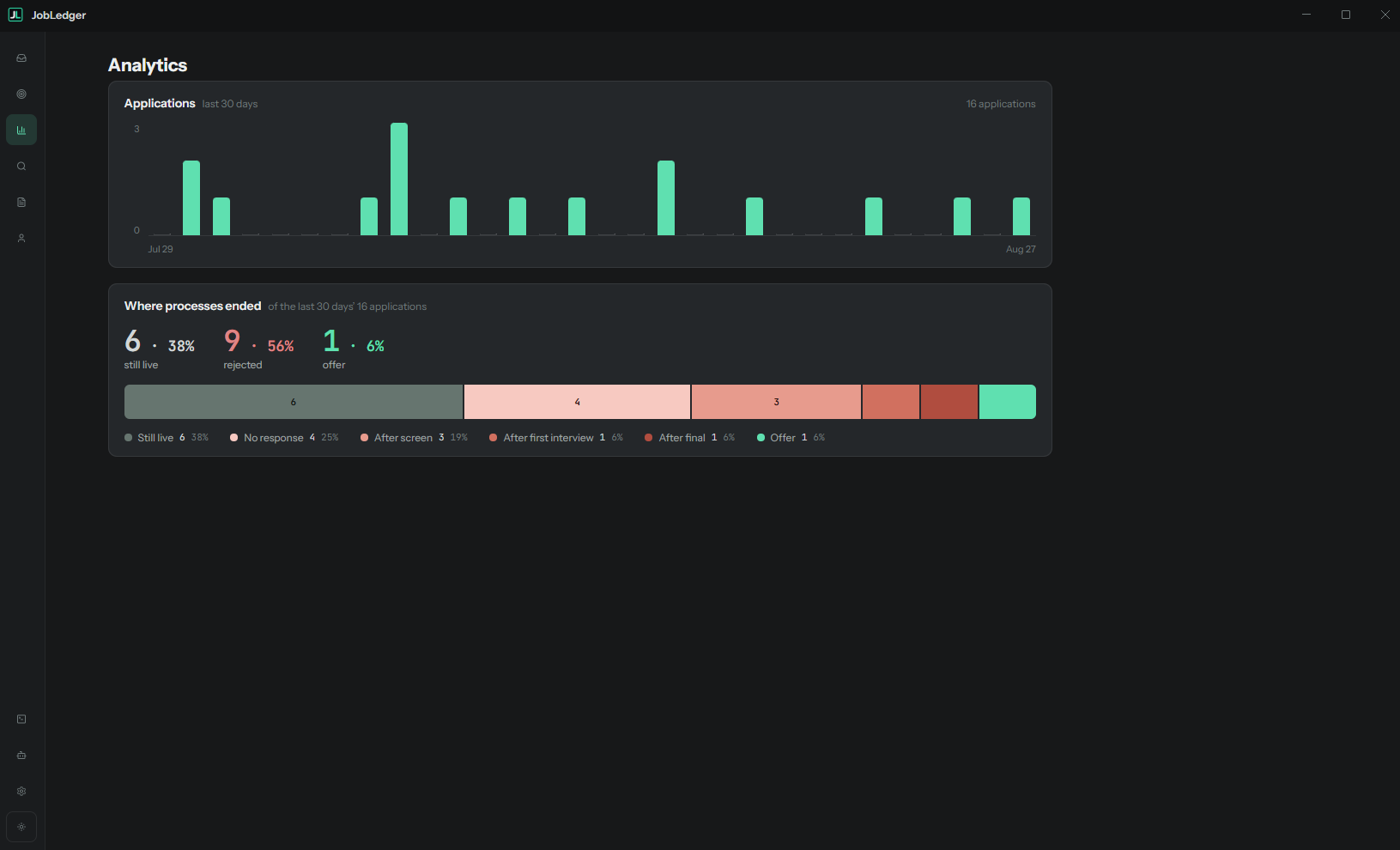
Analytics: applications over the last 30 days, and a breakdown of where processes ended: still live, no response, after screen, after first interview, after final, offer
03 — SEARCH

Searches run themselves

Describe what you're looking for and where to look in plain text, then run it manually or on a schedule. A run the app missed while closed queues up and fires on next launch. Each run lands structured candidates: company, title, location, comp, posted date, a one-paragraph summary, and a URL the agent actually fetched. Deduplication remembers everything you've already seen, at every stage, so each run brings only what's new.

Saved searches with their schedules, last-run history and result counts
FIT LOWMEDHIGH
"Six years of exactly this stack, two of them leading it."
WANT LOWMEDHIGH
"3,000-person org, well past the stage you said you're looking for."
04 — SCORING

Fit and Want, kept apart

Two independent Low / Medium / High scores, proposed at search time and always yours to edit. Fit: can you plausibly do this job. Want: do you actually want it. High-fit/low-want and low-fit/high-want are both real, and both worth seeing before you spend an evening on an application. Each score carries a one-line justification, and the justification is what you argue with.

05 — THE PROFILE

Briefed once, read by every run

Career facts on one side, what you're looking for on the other. Every agent reads both, so each run arrives already briefed. Fit is judged against the first half, Want against the second. The screen tells you plainly when a half still needs filling in, so you always know what a score was judged against.
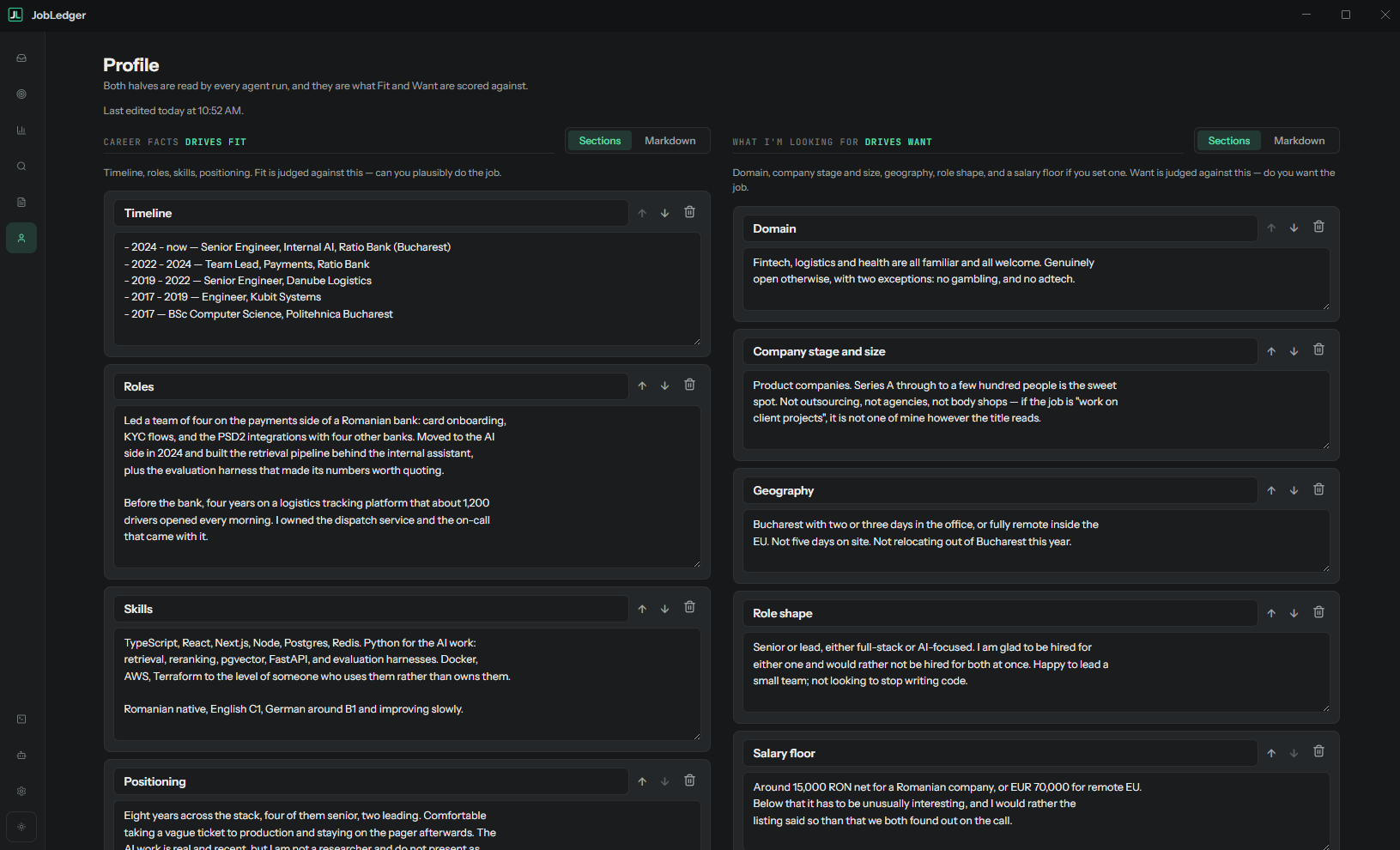
Profile: career facts driving Fit on the left, and what I'm looking for driving Want on the right
06 — APPLICATIONS

Every application in one place

Promoted roles wait under To apply with their scores and the recommended CV a click away. Applied ones move to Active, carrying status, contacts and a staleness flag. Ended ones keep their whole story. Three tabs hold the entire hunt, and a tip from a friend or a LinkedIn find joins it directly via New from link.
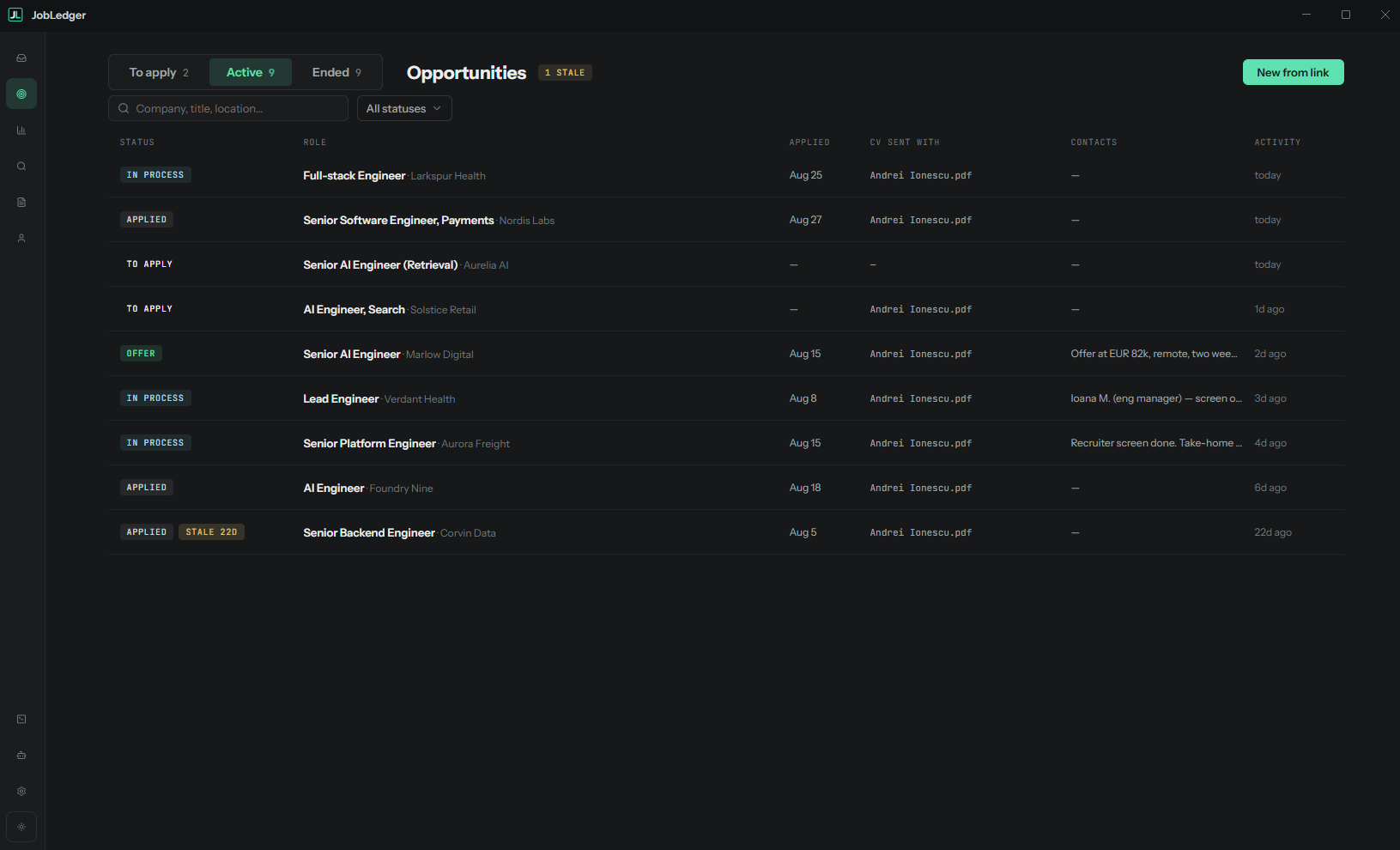
Opportunities: the Active tab listing applications with status, applied date, the CV each was sent with, contacts and last activity
07 — CVS

CVs as first-class objects

Register the CV files you already have, with a label, tags, and where each lives on disk. An agent recommends which one fits each opportunity, and the pick is recorded, so "which CV framing got through" becomes a question with an answer. Tailored generation comes later, once the record shows which framing works.
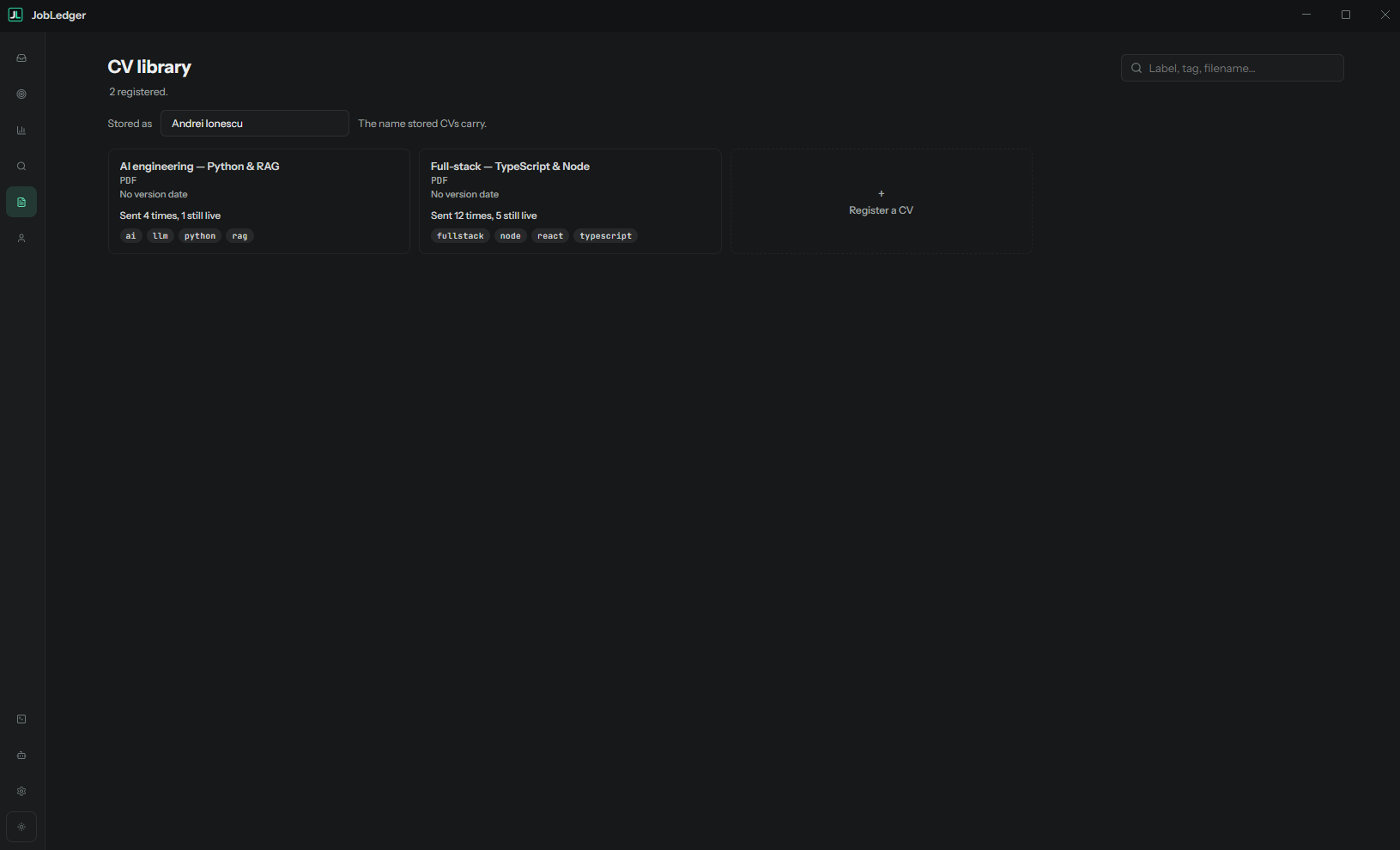
CV library: registered CV files with their tags and how many times each was sent and is still live

How it stays yours

You send every application

JobLedger prepares, scores and records; submitting is always your move. Application forms vary wildly, and some sites have started screening out agent-submitted applications, so a human hitting send is both safer and more reliable.

Depth over volume

Each application is recorded with its source, CV and outcome, so the next one is better aimed.

Your CVs, chosen well

It recommends from the CVs you already have, and keeps track of how each one performs.

Everything on your machine

One local user, one SQLite file. Back it up by copying it.

Your agents, your rules

JobLedger runs on the CLI agents you already have, Claude Code or Codex, and everything about how they work is in your hands.

Pick the provider and model

Switch between Claude and Codex, and choose the model per agent. The tasks are simple: searching and scoring. The recommended low-cost settings go easy on your credits.

Edit the system prompts

Every agent's system prompt is visible and editable in Settings. If the CV recommender or search agent should think differently, tell it so.

Tune the runs

Set how many searches run in parallel, their timeout, and the staleness threshold. The queue screen shows what agents are doing and what each run did.

MCP for external agents

An optional MCP server lets your own agents connect to the app. Off by default, on when you want it.

BUILT ON STREAMKANBAN

Same architecture, same visual language. JobLedger lifts StreamKanban's process model wholesale, including the job queue, crash recovery and the MCP surface. It exists partly to dogfood it: a real app built on that workflow, recording where it hurts.

streamkanban.forgebotica.com →

Make the next hundred applications produce a diagnosis.

Download for Windows
Free · Windows 10 / 11 · runs on Claude Code or Codex · your data stays on your machine